
(Prefer videos? Watch a brief summary of this article below.)
Key Facts at a Glance
- Faster arrivals: Guests start at a kiosk, tablet, or screen and contact the staff via live video when needed.
- Human service stays visible: Video chat check-in keeps eye contact, guidance, and reassurance in the process.
- Remote teams scale better: One trained agent can support several properties, branches, or service desks.
- Best use cases: Hotels, serviced apartments, transport hubs, corporate lobbies, banks, clinics, and customer service points.
- Core technology: Self-service check-in, video customer service, identity verification tools, access issuance, and PMS integration.
- Main success factor: Guests must see it as better service, not as a cold shortcut.
The front desk is changing because arrivals have changed. Guests land late. Staff schedules stretch thin. Queues form in minutes. Video check-in relieves that pressure by connecting people to real staff through a digital touchpoint, without requiring every desk to be staffed at all times.
It is not “automation instead of service.” Done well, it is service in the right place, at the right time, on the right screen.
Why Check-In Processes Need to Change
Check-in has become too rigid for modern traffic patterns. Hotels and service locations need a model that handles rush hours, quiet periods, and after-hours arrivals without breaking the guest experience.
Long queues at reception
A line at reception is not neutral. It feels like lost time.
For hotels, the guest may be tired, carrying luggage, and ready for the room. For businesses, a waiting visitor blocks the lobby and pulls employees away from higher-value work.
Staff shortages and peak times
Peak demand rarely respects staffing plans. A desk can be silent at 2 p.m. and overwhelmed at 6 p.m.
A remote check-in system helps balance this. Staff do not have to sit idle at every location. They can appear by video when the arrival actually needs human support.
Growing expectations for fast service
Guests already use mobile boarding passes, QR tickets, digital payments, and self-service kiosks. Reception is now judged against that standard.
What Is Video Check-In?
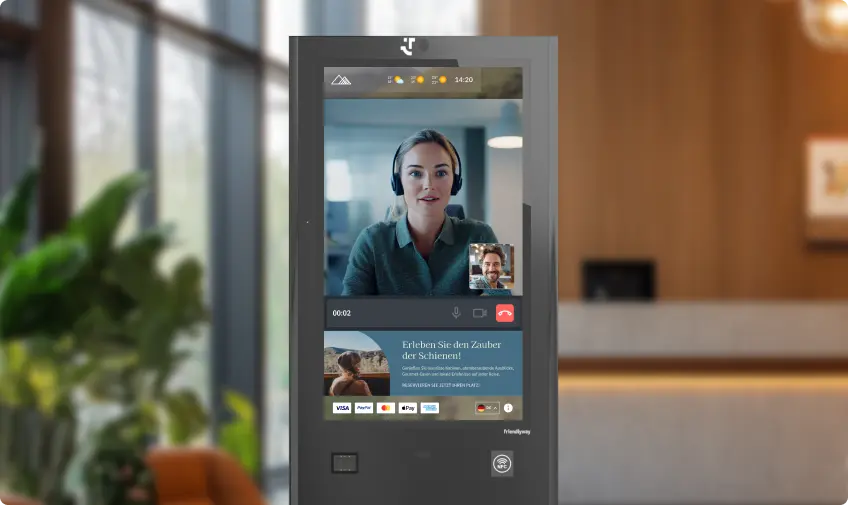
Video check-in is a live, assisted digital arrival. A guest starts on a kiosk, tablet, or other device, then connects via video to a remote employee to complete the process.
Definition in hospitality and customer service
In hospitality, video check-in workflows combine booking lookup, identity checks, payment support, and key or access delivery.
In customer service, the same concept applies to visitors at banks, public offices, clinics, retail branches, and corporate reception points. The person on screen may be a receptionist, concierge, advisor, interpreter, or specialist.
Difference between traditional and remote check-in
Traditional reception depends on a person standing behind a desk. Remote reception separates the service from the physical location.
That difference sounds small. It is not.
| Model | Staff location | Guest experience | Best fit |
|---|---|---|---|
| Traditional front desk | On site | Personal, familiar | Luxury welcomes, complex cases |
| Self-service only | Optional | Fast, but limited | Simple, low-risk arrivals |
| Video chat check-in | Remote or hybrid | Guided, flexible, human | Multi-site service, peaks, late arrivals |
How Video Check-In Works in Practice
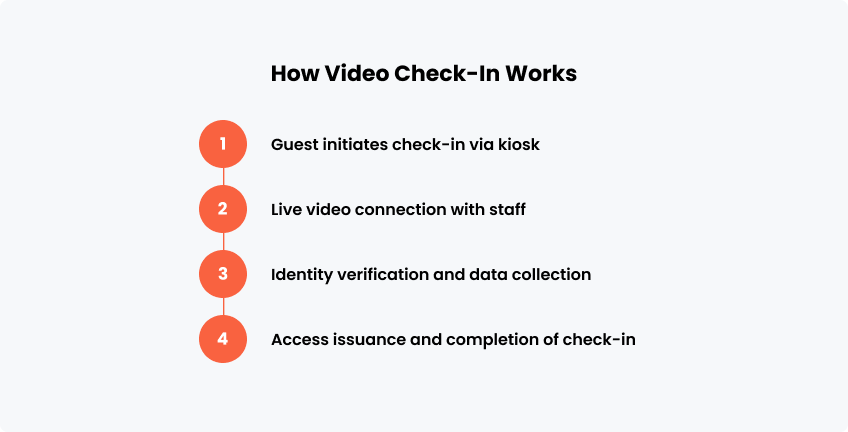
The guest should not feel the complexity. The journey must feel obvious: start, connect, verify, receive access, move on.
1. Guest initiates check-in via kiosk or mobile device
The guest begins at a self-service kiosk, tablet, wall-mounted screen, or mobile device.
They may scan a QR code, enter a booking number, type a name, choose a language, or tap a call button. The screen should give one next step at a time. No clutter. No guessing.
2. Live video connection with staff
When support is needed, the system opens a live video session with a trained agent.
With a video chat, businesses can provide remote consultation and customer support through kiosks or tablets. The point is simple: expert help can be central, while the service point stays local.
3. Identity verification and data collection
The agent can guide the guest through document capture, registration forms, digital signatures, and consent steps.
For hotels, identity verification workflows may include scanning passports or ID cards. For offices, the process may include visitor type, host name, access rights, badge printing, and safety instructions.
4. Access issuance and completion of check-in
The final step is access. That may be a room key, a QR code, a PIN, a badge, a ticket, or door-opening instructions.
The session should end only when the visitor knows where to go next. A good system does not abandon people at “completed.” It guides them forward.
Where Video Check-In Is Used
Video-based arrival is well-suited to locations where people need speed, reassurance, and verification. Hospitality is the obvious case, but not the only one.
Hotels and serviced apartments
Digital check-in setups are useful for late arrivals, unmanned lobbies, limited-service properties, aparthotels, and multi-property operators.
A night guest can still talk to a real person. A busy lobby can move faster. A regional team can support several desks from a single location.
Airports and transport hubs
Transport hubs are built on movement. Nobody wants to hunt for help.
Video reception points can support passenger questions, VIP handling, driver registration, contractor access, lost-and-found routing, and service escalation.
Customer service points and front desks
Banks, clinics, municipal buildings, showrooms, and offices often need specialist help at the front line.
Instead of staffing every branch with every expert, businesses can use video customer service to route people to the right person fast. It is customer service automation with a face.
BayWa shows how video-based service works beyond hospitality. In its building materials stores, customers use friendlyway Welcome 43 Pro kiosks to speak with central experts via Microsoft Teams, receive product advice, complete EC card payments, and print documents directly at the kiosk. The result is faster access to specialist knowledge without requiring every expert to be present in every branch.
What Changes with Video-Based Check-In
The biggest shift is control. Businesses can cover more service moments without duplicating teams at every desk.
Reduced waiting times
Routine steps move to the screen. Exceptions move to people.
That split matters. Guests who can complete self-service check-in continue quickly. Guests who need help are not left alone; they get a live agent.
Remote staff handling multiple locations
One remote reception team can serve multiple hotels, branches, floors, or entrances.
This is especially useful where arrivals come in waves. Instead of staffing for the worst 20 minutes of the day, teams can flex across locations.
Consistent service quality
A video reception system can use the same scripts, branding, escalation rules, and data fields across all locations.
That creates a steadier guest experience hotel teams can measure. Same greeting. Same compliance steps. Same service promise.
Give guests and visitors live help from your central team, even when no specialist is on site.
Technologies Behind Video Check-In
A strong solution is not just a camera. It is a connected service layer in which hardware, software, data, and security work together.
Video chat platforms and connectivity
The video call must feel immediate. Audio should be clear. The camera should frame the guest naturally.
Lag, poor sound, or broken calls damage trust fast. Commercial-grade connectivity and monitoring are not optional.
Self-service kiosks
The kiosk is the physical anchor of the experience. It must be visible, stable, accessible, and branded.
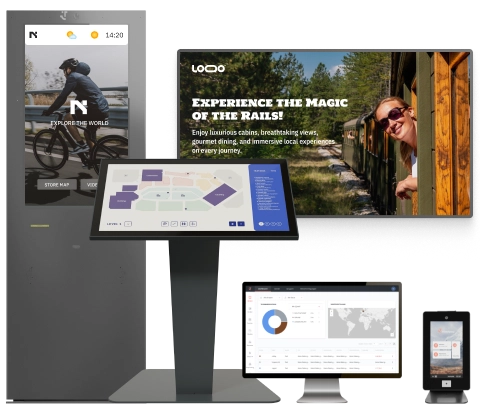
Solutions such as friendlyway self-service kiosks can support check-in, wayfinding, registration, and customer interactions in a single digital point.
Integration with PMS and CRM systems
Property management system (PMS) integration connects reservations, room status, guest profiles, payments, and access rights.
CRM integration does similar work in service environments. It helps teams identify customers, record the interaction, and trigger the next workflow.
Secure identity verification tools
Security must be designed into the journey, not added later.
Important tools include:
- ID or passport scanning
- Encrypted video sessions
- Digital signatures
- Role-based staff permissions
- Clear privacy notices
- Audit trails for completed steps
For corporate lobbies, friendlyway Visitor Management supports visitor registration, badge workflows, notifications, and controlled access.
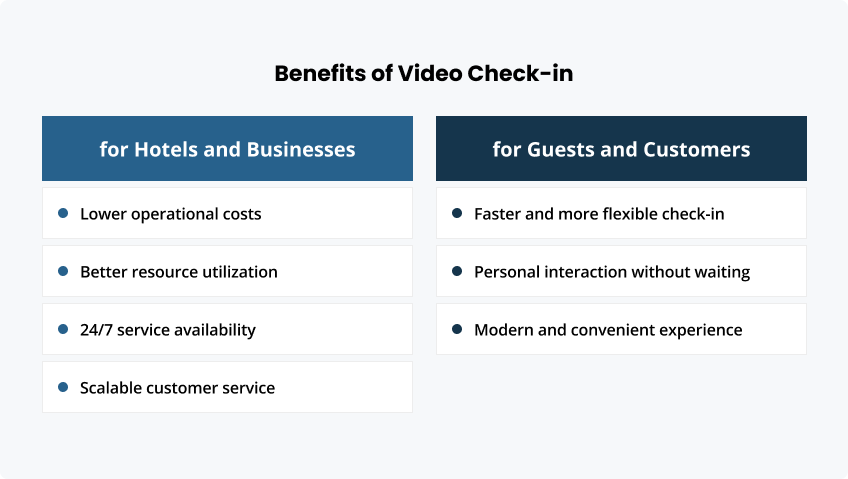
Benefits for Hotels and Businesses
The business value is practical: better coverage, lower idle time, and a smoother way to serve many locations.
Lower operational costs
Remote reception reduces the need to staff every desk for every hour.
That does not mean removing people from service. It means putting them where demand appears. A small team can handle early checkouts, late check-ins, overflow traffic, and simple questions across sites.
Better resource utilization
Specialists are expensive to duplicate. Multilingual staff, night managers, senior agents, and technical advisors cannot be everywhere.
With video check-in, they do not have to be. They can support more guests without walking between desks or waiting for the next arrival.
24/7 service availability
After-hours service is one of the clearest wins.
A guest arriving at 1 a.m. can still reach a person. A contractor entering a building before office hours can still be verified. A customer in a low-traffic branch can still get expert support.
Scalable customer service
The model grows cleanly. Start with one reception point. Add more kiosks, tablets, or service desks later.
The friendlyway Cloud Platform helps manage connected digital touchpoints, content, and service experiences across locations.
Benefits for Guests and Customers
Guests do not ask whether the agent is local or remote. They ask a simpler question: “Can I get helped now?”
Faster and more flexible check-in
Video-supported arrival lets people check in when the desk is busy, closed, or not physically staffed.
It also protects guests from the worst version of hotel check-in automation: a screen with no escape route. Here, help is one tap away.
Personal interaction without waiting
Contactless check-in can feel sterile. Video changes that.
A remote agent can smile, clarify, calm, explain, and adapt. That human signal matters when documents fail, names do not match, or a tired guest needs reassurance.
Modern and convenient experience
A polished arrival creates confidence.
The guest sees clear instructions, fast response, and competent support. The business looks prepared. Not futuristic for the sake of it. Ready.
Combine kiosks, live video support, visitor workflows, and access control into a single branded journey.
Challenges and Considerations
Video-based check-in needs careful rollout. The front-desk technology may be digital, but the reaction is deeply human.
Connectivity and technical reliability
The service must work every time it is needed.
Use reliable hardware, strong network planning, remote monitoring, fallback numbers, and clear escalation paths. When the screen fails, the process needs a Plan B.
User experience design
Guests should not have to decode the system.
Use large buttons. Offer language choices early. Show expected wait times when possible. Place the kiosk where people naturally stop. Add signage that explains the benefit in plain words.
Privacy and data protection
People are sensitive about cameras, IDs, and remote agents.
Make the privacy logic visible. Tell guests what data is collected, why it is needed, and how it is protected. Keep sessions discreet, especially in open lobbies.
The public debate is real. Last year, NDTV covered a viral video of a Miami hotel guest being checked in via a video call system by a remote front-desk worker; the clip triggered strong reactions about outsourcing, local jobs, and the feel of virtual reception.
That story carries a useful lesson. Do not hide the model. Frame it honestly. Design it well. Make the guest feel served, not processed.
FAQ
Video check-in is a digital arrival process in which a guest or visitor connects with a real employee via live video to complete registration, verification, questions, and access.
The guest starts at a kiosk, tablet, or device. The system collects basic details, connects to remote staff, verifies identity or booking data, and issues the right access.
Yes, when it uses encrypted communication, controlled data access, secure ID handling, privacy notices, and clear audit trails. Security depends on implementation, not the camera alone.
It can replace some traditional desk tasks, especially routine arrivals and after-hours coverage. For high-touch service, it often works best as a hybrid layer alongside local staff.
It is most useful in hotels, serviced apartments, offices, transport hubs, healthcare entrances, banks, retail service points, and multi-location businesses with uneven visitor traffic.