
(Prefer videos? Watch a brief summary of this article below.)
A fire alarm sounds. People move. Doors open. Radios crackle. Then comes the question that decides everything: “Who is still missing?” In a modern facility, guessing is not a plan. Emergency mustering systems turn that anxious moment into a structured, visible process.
At a Glance
- Emergency mustering systems show who is on site, who reached a muster point, and who needs help.
- Digital mustering supports evacuation management, drills, audits, contractor safety compliance, and post-incident analytics.
- The best systems connect with visitor management, access control, badges, kiosks, wearables, and dashboards.
- Real-time evacuation tracking helps security, EHS, and facility teams act from the same facts.
- Mustering is no longer only for major incidents. It improves daily safety discipline across factories, campuses, offices, logistics hubs, and public buildings.
What Is an Emergency Mustering System?
Before looking at benefits, it helps to define the system in plain language.
Core definition and purpose
An emergency mustering system is a workplace safety system that accounts for personnel during an emergency, a drill, or a controlled movement.
It answers three questions fast:
- Who entered the site?
- Where should they go?
- Who has checked in safely?
This includes employees, contractors, visitors, delivery drivers, and temporary staff.
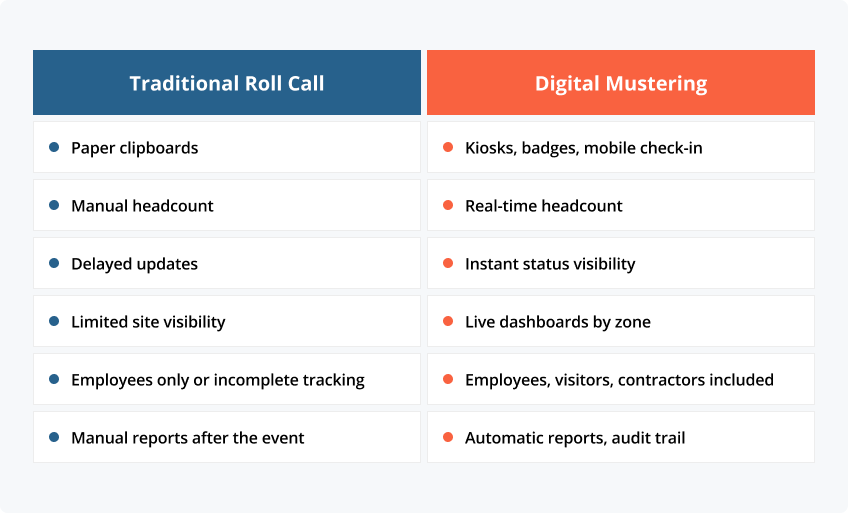
Traditional methods vs. digital mustering
Paper roll calls still exist. So do spreadsheets, radios, clipboards, and handwritten visitor books.
They can work on a quiet day. They struggle when smoke, noise, shift changes, language barriers, or blocked exits come into play.
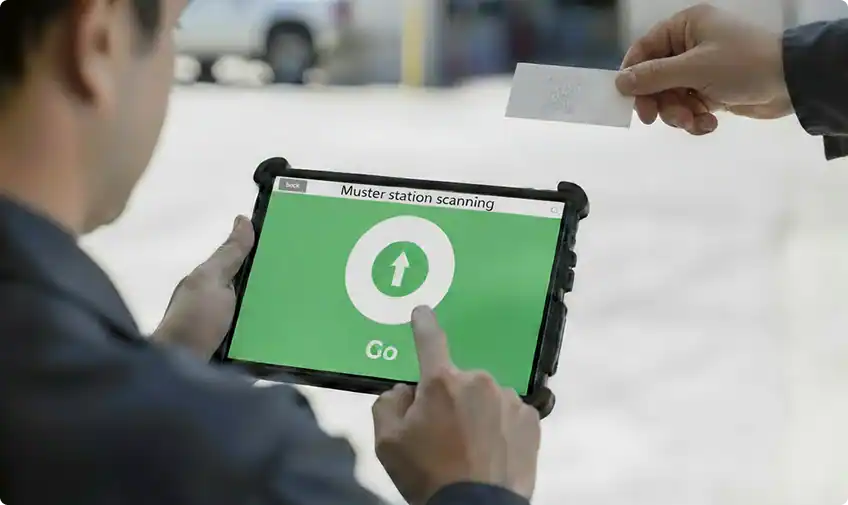
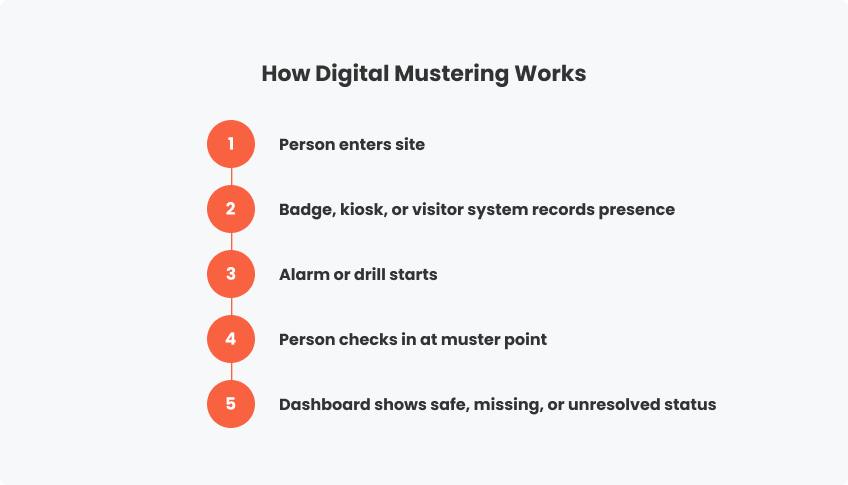
Digital mustering replaces manual uncertainty with onsite headcount visibility. People scan a badge, tap an RFID card, use a mobile app, or check in at a kiosk. The system updates the emergency management dashboard in real time.
Key industries that rely on mustering technology
Mustering matters wherever risk and foot traffic meet.
Common examples include:
- Manufacturing plants with high-risk production lines
- Chemical, energy, and utility sites
- Logistics hubs and warehouses
- Data centers and corporate campuses
- Hospitals, universities, and public buildings
- Construction sites with rotating contractors
- Trade fairs, arenas, and large venues
For these environments, employee accountability during emergencies is not just helpful. It is operationally critical.
Core Benefits Beyond Emergency Evacuation
Evacuation is the headline use case. Yet the real value appears before and after the alarm.
Real-time headcounts during drills and incidents
During a drill, a safety manager can see which department reached the muster point in three minutes and which one took seven.
During an incident, the same view becomes urgent. Real-time evacuation tracking helps teams avoid sending responders into danger based on outdated information.
Ensuring compliance with OSHA and safety standards
Mustering for OSHA compliance often starts with a simple requirement: know how people will be accounted for after an evacuation.
In the US, OSHA standards specifically require a written Emergency Action Plan (EAP), and their checklist includes identifying assembly areas and procedures for accounting for all employees after evacuation.
For European and global organizations, the same logic supports ISO-aligned safety management, local labour rules, and internal audit expectations.
Automating reporting and documentation
After a drill, nobody wants to reconstruct the timeline from memory.
Digital mustering logs:
- Alarm time
- Check-in time
- Missing persons
- Muster point check-in status
- Zone clearance
- Exceptions and delays
- Corrective actions
This creates safety audits and reporting that are easier to review, share, and improve.
Enhancing coordination between security and EHS teams
Security knows who entered. EHS knows the emergency plan. Facilities understands the building.
A mustering platform brings those views together. The result is faster decisions and fewer duplicated calls.
Discuss how friendlyway can support visitor evacuation and real-time safety communication.
Workforce Accountability and Visibility
Accountability starts long before an evacuation route is used.
Tracking employees and contractors on-site
Workforce location tracking helps teams understand site occupancy in real time.
This is especially useful for contractors who arrive for short jobs, move between zones, and may not be aware of local evacuation procedures. A connected system can confirm induction status, badge validity, access permissions, and emergency contact data.
Verifying safe zones during incidents
A person is not safe just because they left one building.
They may have moved toward the wrong gate. They may be waiting near a loading bay. They may be sheltering in place because evacuation is unsafe.
Digital mustering supports safe zone verification by showing where people checked in and which zones remain unresolved.
Integrating with access control and VMS
The strongest data for mustering often comes from systems already in use.
A modern visitor management system can register guests, collect safety confirmations, and issue badges. Access control adds entry and exit signals. Kiosks provide visible check-in points.
Together, they create a live view rather than a static list.
Use Cases in Daily Operations
Mustering earns its place when it helps on ordinary days, not only in rare emergencies.
Fire drills and scheduled safety checks
Emergency drills software can turn a routine drill into useful intelligence.
A plant manager might learn that one assembly point is overcrowded. A campus security team may discover that visitors were not briefed clearly. A warehouse may find that night-shift contractors missed the alert.
Each finding becomes an improvement.
High-risk zones and lone worker monitoring
In high-risk areas, minutes matter.
Mustering tools can support lone worker monitoring by integrating zone access, badge presence, mobile check-ins, and escalation workflows. If a technician enters a restricted utility room and does not confirm a safe exit, the system can flag the exception.
Event or shift change coordination
Shift change is messy. Hundreds of people may be entering and leaving at once.
Digital mustering helps confirm who is actually present when an alarm occurs. That matters in factories, airports, hospitals, and venues where attendance changes by the minute.
Large facility or campus monitoring
Large sites need more than one muster point.
Emergency management dashboards can show multiple buildings, zones, gates, and assembly areas. This helps central security coordinate with local wardens without losing the overview.
Technology and Integration Options
The right technology mix depends on risk, infrastructure, and operating model.
Cloud-based vs on-premises systems
Cloud-based safety systems are easier to scale across regions. They support centralized dashboards, remote administration, and faster updates.
On-premises systems may suit critical facilities with strict network policies. Some organizations choose a hybrid model that combines local resilience with cloud reporting.
Wearables, RFID badges, and mobile tracking
RFID badges are fast and familiar. Wearables can help in harsh industrial environments. Mobile tracking can support flexible workforces and temporary teams.
The lesson is clear: technology should reduce blind spots, not create more complexity.
Integration with visitor management and access control
A mustering solution should not live alone.
It should connect with:
- Visitor registration
- Employee directories
- Access control
- Badge printing
- Contractor databases
- Training systems
- Digital signage
- Alarm and notification tools
With friendlyway Digital Signage, emergency instructions can appear on screens, kiosks, tablets, and panels across a site. That makes evacuation guidance visible where people need it.
Data analytics and dashboards
Post-incident analytics help teams move from “we handled it” to “we improved it.”
Dashboards can show drill performance, late check-ins, recurring bottlenecks, and zone-level response times. Over time, this turns evacuation readiness tools into a continuous improvement engine.
Connect visitor flows, signage, kiosks, and mustering workflows to deliver a clear emergency response.
Implementation and Best Practices
A good mustering system is not just installed. It is adopted.
Step-by-step deployment strategy
Start with the real site, not the ideal diagram.
A practical rollout looks like this:
- Map buildings, zones, exits, and muster points.
- Define who must be counted.
- Connect access, HR, contractor, and visitor data.
- Choose check-in methods.
- Configure alerts and escalation rules.
- Test with one site or department.
- Review results and scale.
Keep the first phase focused. Accuracy beats complexity.
Training teams and running mock drills
People need to know what “good” looks like.
Train reception teams, wardens, security, EHS, and department heads. Run short mock drills. Change the scenario. Block one exit. Add a visitor group. Include a contractor who forgot to check out.
That is how systems become habits.
Maintaining system accuracy and uptime
Mustering only works if the data is current.
Review badge rules, visitor checkout, contractor expiration dates, device health, and network resilience. Use backup methods to account for power loss, poor Wi-Fi, or damaged infrastructure.
For global rollouts, friendlyway’s modular platform and hardware-software approach can help align kiosks, digital signage, and self-service workflows across different sites. Learn more about the broader friendlyway platform.
Emergency Mustering Is a Business Continuity Tool
The best emergency mustering systems do more than support evacuation management. They build confidence.
They help leaders see who is safe. They help responders focus where help is needed. They help auditors understand what happened. They help teams improve before the next alarm.
Most importantly, they make safety visible every day. In a world of complex sites, mixed workforces, and rising expectations, that visibility is no longer optional.
FAQ
Yes, with the right architecture. Some systems support local servers, offline badge reads, cellular fallback, or cached device data. Critical sites should define fallback processes before deployment.
Accuracy depends on data quality and check-in discipline. RFID badges, access control, visitor management, mobile check-ins, and muster point kiosks can make headcounts far more reliable than paper lists.
Yes. Multi-site dashboards are one of the strongest reasons to use digital mustering. Regional safety teams can compare readiness, drill performance, and incident reports across locations.
The system flags the person as missing or unresolved. Security and EHS teams can see the person’s last known entry, assigned zone, host, visitor type, or contractor company, and escalate accordingly.
Yes. In fact, they should be. Visitor evacuation inclusion and contractor safety compliance are essential because non-employees may be less familiar with exits, alarms, and muster points.