

Key Takeaways
- A VMS gives you a live, reliable headcount of who’s actually inside your building.
- Security and compliance stop feeling like juggling acts thanks to verified identities, clean digital trails, and tight links to your existing systems.
- Visitors breeze through check-in with a more polished welcome, while your team escapes the constant grind of manual front-desk admin.
Clipboards, illegible signatures, and mystery visitors who “forgot” to sign out — if that sounds like your reception area, you’re not alone. Traditional visitor books were never designed for modern security, compliance, or the sheer pace of today’s workplaces.
A visitor management system (VMS) replaces all of that with a smart, digital check-in experience. It gives you a real-time view of who’s on-site, automates guest workflows, and turns the front desk into a genuinely strategic part of your operation, not just a place where people queue.
In this guide, we’ll walk through what a VMS is, how it works, and 12 concrete benefits you can expect when you replace paper logs with a modern, digital solution.
If you’re keen to move beyond paper and clipboards, this is the moment to see what a VMS can really do.
What Is a Visitor Management System?
A visitor management system (VMS) is software that manages all individuals who enter your building, including visitors, contractors, vendors, and even employees.
Instead of writing their name in a book, guests:
- Pre-register online or via email link (optional but convenient)
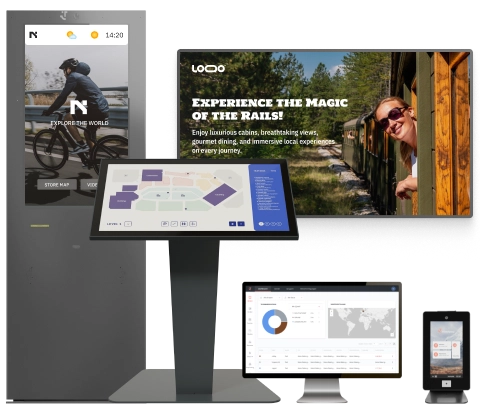
- Check in on a lobby kiosk or tablet
- Verify their identity and accept policies or NDAs
- Have their host notified automatically
- Receive a printed or digital badge
- Check out when they leave, closing the loop in your records
Behind the scenes, your VMS is syncing with tools like access control, badge printers, and employee directories, so your team doesn’t have to manage these steps manually.
Paper Logbooks vs. Visitor Management Systems
Before we dive into the benefits, it’s helpful to compare the old approach with the new one.
| Paper Logbooks | Visitor Management System (VMS) |
|---|---|
| Handwritten names and contact details | Clean, validated, structured visitor data |
| Easy to skip or fake entries | Enforced check-in steps and identity verification |
| No real-time view of who’s on-site | Live occupancy dashboard and on-demand evacuation lists |
| Manual host notification (phone/email) | Automatic host alerts via email, SMS, or app notifications |
| Hard-to-search, error-prone records | Searchable digital log with filters and export options |
| One-size-fits-all process | Custom workflows by visitor type, location, or industry |
| Wasted paper, badges, and storage space | Eco-friendly, paper-light, or paperless operation |
Why Teams Choose a VMS Today
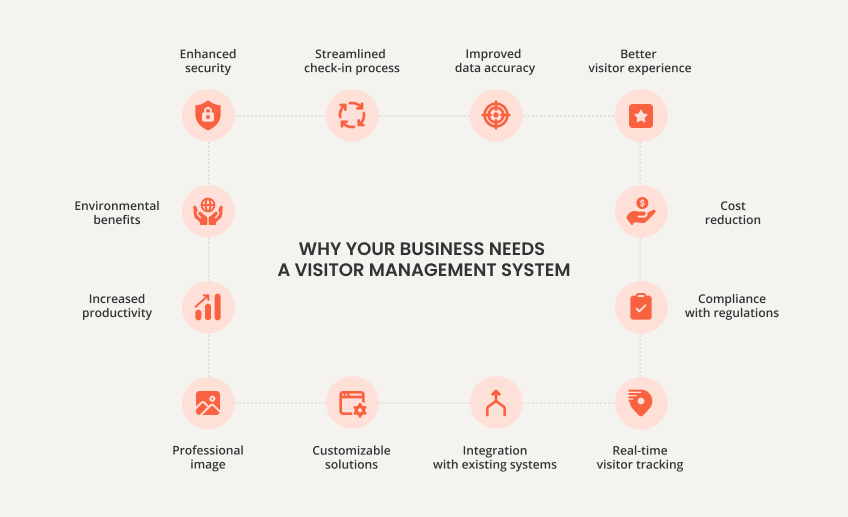
Implementing an electronic VMS can transform the way your business handles visitor interactions. Here are 12 compelling reasons why you should consider adopting this technology:
1. Stronger Security From the Front Door In
Security isn’t just about cameras and access cards; it starts with knowing exactly who is in your building and why they’re there.
A VMS:
- Captures verified visitor details at check-in
- Associates each guest with a host and the purpose of their visit
- Flags unwanted or restricted visitors
- Can integrate with access control to grant or restrict access automatically
Instead of flipping through a messy logbook after an incident, your security team can pull a complete, timestamped digital history in seconds.
2. Fast, Frictionless Check-In
No one enjoys queuing at the front desk to scribble their name on a form.
A modern VMS can:
- Offer pre-registration links in calendar invites
- Let visitors scan a QR code to check in instantly
- Provide self-service kiosk or tablet check-in options
- Speed up repeat visits by recognizing returning guests
The result: shorter lines, fewer interruptions for reception staff, and a smoother experience for everyone walking through your doors.
3. A More Professional, On-Brand First Impression
Your lobby is your handshake. If the first thing visitors see is a worn-out binder and a pen on a chain, it sends a message — and not the one you want.
With a VMS, you can:
- Brand the check-in screen with your logo, colors, and welcome messaging
- Display safety or promotional content on digital signage while visitors wait
- Print visitor badges with your branding and clear identification
- Offer a polished, tech-forward experience that reflects your organization’s standards
It’s a small shift that makes a big difference in how partners, clients, and auditors perceive your operation.

4. Real-Time Visibility and Occupancy Awareness
At any moment, you should be able to answer one simple question: “Who is inside our building right now?”
A VMS gives you:
- A live dashboard showing visitors, contractors, and employees on-site
- Check-in/check-out timestamps for each person
- The ability to filter by location, visitor type, host, or time period
This isn’t just a security advantage; it’s operational intelligence. You can identify patterns in visitor traffic, determine when the lobby is busiest, and make informed staffing or scheduling decisions based on real data.
5. Better Compliance and Audit Trails
Whether you’re thinking about GDPR (European operations), HIPAA, OSHA, ISO standards, or industry-specific regulations, one thing is consistent: you need accurate records and sensible data practices.
A VMS helps you:
- Collect only the data you actually need
- Store it securely with role-based access controls
- Establish retention periods and automatic deletion policies
- Generate audit-ready reports on who visited, when, and why
When a regulator, auditor, or customer asks for proof of controls, you don’t scramble — you export.
Stat: In 2024, GDPR fines totaled €1.2B, highlighting the importance of compliance (GDPR Enforcement Tracker by CMS).
6. Seamless Integrations With Your Existing Systems
A VMS becomes even more powerful when it plugs into systems you already rely on.
Typical integrations include:
- Access control (for issuing visitor cards or temporary access rights)
- CCTV systems (for correlating video with visitor logs)
- SSO and HR systems (to sync employee directories and hosts)
- Badge printers (for automated badge creation)
Instead of bolting on yet another standalone tool, you get a connected ecosystem where visitor data flows automatically between systems and manual work disappears.
7. Better Emergency Preparedness and Safety
When there’s a fire drill, natural disaster, or real emergency, you don’t want to guess who’s inside the building.
With a VMS, you can:
- Generate a real-time evacuation list at the click of a button
- See where visitors checked in and who their host is
- Support roll call at assembly points using printed or digital lists (on muster-station tablets)
A simple scenario:
- An alarm is triggered.
- Your safety team pulls the live list of everyone on-site.
- At assembly points, team members tick people off the list — visitors and employees.
You’re not relying on memory, paper logs, or scattered sign-in sheets. You have structured data supporting your emergency plan.
8. Lower Administrative Workload and Costs
Behind every handwritten visitor log lies a hidden pile of admin work: transcribing names, updating spreadsheets, tracking badges, and digging through binders when you need information.
A VMS reduces that burden by:
- Automating check-in and check-out
- Eliminating manual entry into separate systems
- Reducing calls and emails to notify hosts
- Minimizing time spent searching for old records
There’s also a direct cost impact: less paper, fewer printed forms, lower badge waste, and a front-desk team that can focus on higher-value tasks instead of clerical work.
9. Insights From Visitor Analytics
Visitor data isn’t just for compliance; it can inform smarter decisions.
From your VMS reports (often AI-powered), you can learn:
- Which days and times see the most visitor traffic
- Which departments or hosts receive the most guests
- How long visitors typically stay on-site
- How often contractors or vendors visit specific facilities
These insights can help you optimize staffing, plan access control policies, refine security procedures, and improve the visitor journey over time.

10. Scalable for Multi-Site and Growing Operations
What works for one reception desk doesn’t always work for ten.
A cloud-based VMS scales easily as you open new locations or expand existing ones:
- Standardize visitor policies and workflows across sites
- Maintain a centralized view of all locations in one dashboard
- Apply local customizations where needed (languages, policies, entry points)
Whether you’re running a single office, a campus, or a global footprint, a VMS grows with you, rather than becoming another system that needs to be replaced.
11. Tailored Workflows for Different Industries
No two organizations handle visitors in the same way. That’s why a flexible VMS lets you build different journeys for different visitor types and industries.
For example:
- Manufacturing: Safety videos and PPE acknowledgments during check-in
- Healthcare: Extra verification, consent forms, ward restrictions, and HIPAA compliance
- Education: Watchlists and stricter ID checks for campus safety
- Corporate offices: NDA signing and meeting room coordination
You’re not limited to one generic process. You can design a flow that matches your sector, your risk level, and your policies.
12. Greener, More Sustainable Operations
Paper-based visitor logs, pre-printed badges, and storage for all those binders add up. A VMS helps you move toward a leaner, more sustainable lobby.
You can:
- Cut down drastically on paper sign-in sheets
- Adapt badge policies (reusable badges, digital passes, or QR codes)
- Reduce the need for physical storage of records
Going digital isn’t only convenient; it also supports broader environmental and CSR commitments.
Take the first step towards a smarter, more efficient corporate environment with friendlyway.
How a Modern VMS Fits Into Your Day-to-Day
To see how this comes together, imagine a typical visit to your office with a VMS in place:
- A project partner receives a calendar invite with a link to pre-register.
- On arrival, they scan a QR code at the kiosk, confirm their details, and sign your NDA.
- Their badge prints automatically; meanwhile, their host gets an instant notification.
- Security and reception staff see the visitor appear on the live dashboard.
- At the end of the day, the visitor checks out — and your records are updated automatically.
No handwritten notes, no manual emails, no wondering if your guest is still waiting at the front desk.
The Bottom Line
Your front desk doesn’t have to be a parking lot for people and paper. With a visitor management system, it becomes a smart checkpoint: doors open for the right people, records are built automatically, and audits stop feeling like a fire drill.
You get tighter security, cleaner data, and a lobby that finally reflects how modern the rest of your organization already is.
Curious how that looks in real life?
Book a live demo of friendlyway’s visitor management solution or sign up for a trial to see digital check-in, real-time dashboards, and seamless integrations working together to welcome every visitor the smart way.
FAQs About Visitor Management Systems
Think of it as mission control for your front door. It swaps clipboards and guesswork for pre-registration, digital check-in, and live visitor lists, so you always know who’s in your space and why they’re there.
Instead of hoping people sign the book, it verifies who shows up, logs every entry and exit with timestamps, and ties each visitor to a host. When something feels off, you’re not digging through messy handwriting — you’ve got a clean, searchable record ready to go.
Yes, and that’s where it really shines. It can integrate with access control, CCTV, HR, and directory systems, as well as badge printers. Hence, doors, cameras, and visitor data all tell the same story, rather than living in separate silos.
For most teams, yes. You cut paper and printing, free your front desk from repetitive admin, and lower the odds of costly security or compliance headaches, which are usually far more expensive than the system itself.