(Prefer videos? Watch a brief summary of this article below.)
Key Facts
- Dock scheduling focuses on planning. It manages truck appointments, carrier bookings, dock capacity, and warehouse workloads before vehicles arrive.
- Yard management focuses on execution. A YMS coordinates gate check-in, trailer tracking, yard moves, dock assignments, and departures.
- Dock scheduling can work without a YMS. It is often sufficient for facilities with predictable arrivals, live-load operations, short trailer dwell times, and limited yard complexity.
- Complex yards benefit from a YMS. Dropped trailers, multiple staging zones, frequent yard moves, and congestion require more detailed location and movement control.
- Integration connects planning with execution. Shared identifiers and events across dock scheduling, YMS, WMS, TMS, and ERP provide consistent visibility from carrier booking to departure.
Dock scheduling plans truck arrivals and dock capacity, while yard management controls vehicle and trailer movements after arrival. The main difference between yard management vs dock scheduling is planning versus execution.
A Dock Scheduling System helps warehouses organize appointments and prevent overloaded docks. A Yard Management System (YMS) manages gate check-in, trailer tracking, yard moves, and departures. Facilities with simple operations may need only scheduling, while complex yards often require both.
Connect gate activity, scheduling, vehicle movements, and dock workflows in a shared operational view.
YMS vs Dock Scheduling at a Glance
Both systems coordinate freight operations but solve different problems. Proper scheduling creates the plan; yard management ensures its execution.
Short definition of each system
A Dock Scheduling System manages appointment scheduling, carrier booking, capacity, and expected workloads before trucks arrive.
A YMS coordinates gate management, trailer locations, assignments, and physical movements within a facility.
The essential distinction:
The essential distinction:
- Dock scheduling: When should a truck arrive, and which resources are available?
- Yard management: Where is the truck or trailer, and what must happen next?
Some platforms combine both functions, but their operational responsibilities remain distinct.
Side-by-side comparison table
This yard management system comparison highlights the differences.
| Criteria | Dock Scheduling System | YMS |
|---|---|---|
| Main purpose | Plan appointments | Manage yard execution |
| Operating stage | Before arrival | Arrival to departure |
| Resources | Time slots, dock doors | Trucks, trailers, staging areas |
| Gate check-in | Basic or optional | Arrival and access workflows |
| Trailer tracking | Limited | Location and status monitoring |
| Dock assignments | Planned capacity | Actual positioning |
| Yard moves | Usually not supported | Task assignment and tracking |
| Main users | Planners, carriers | Gate staff, yard jockeys |
| Key metrics | Appointment adherence | Dwell time, move completion |
| Best suited for | Simple yard operations | Complex trailer movements |
A confirmed dock appointment does not mean the truck has arrived or the dock is ready.

What Does Dock Scheduling Manage?
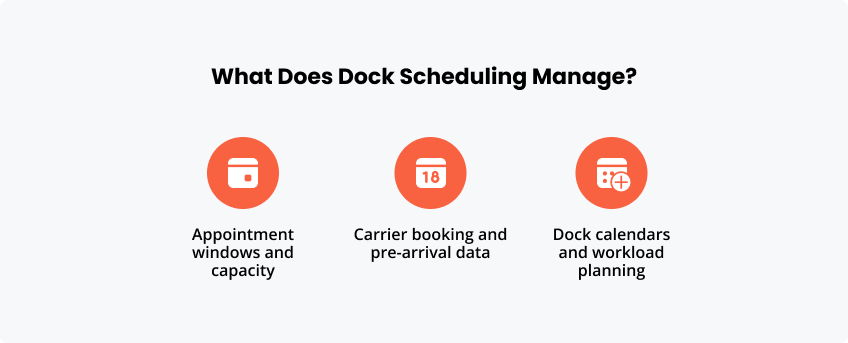
Dock scheduling coordinates truck appointments and warehouse handling capacity. It helps distribute incoming and outgoing freight across available resources.
Appointment windows and capacity
Appointment windows define when carriers should arrive for loading or unloading.
Scheduling considers:
- Dock door availability and operating hours.
- Loading or unloading duration.
- Shipment characteristics.
- Labor and warehouse capacity.
Dock capacity depends on processing resources, not simply the number of doors. Proper scheduling prevents more vehicles from arriving than the warehouse can handle.
Carrier booking and pre-arrival data
A carrier portal allows transport partners to reserve, change, or cancel appointments.
Booking information may include carrier details, vehicle identification, shipment references, expected arrival time, and an Advance Shipping Notice (ASN).
An ASN informs the warehouse about expected goods, supporting preparation before delivery. However, booking confirmation does not establish a truck’s actual location.
Dock calendars and workload planning
Dock calendars display planned arrivals, departures, and resource availability.
Warehouse coordinators can redistribute appointments, identify overloaded shifts, and adjust capacity.
For example, if most deliveries are booked for the morning, planners can offer alternative slots. This improves workload distribution but cannot resolve misplaced trailers or delayed yard movements.
What Does a Yard Management System Manage?
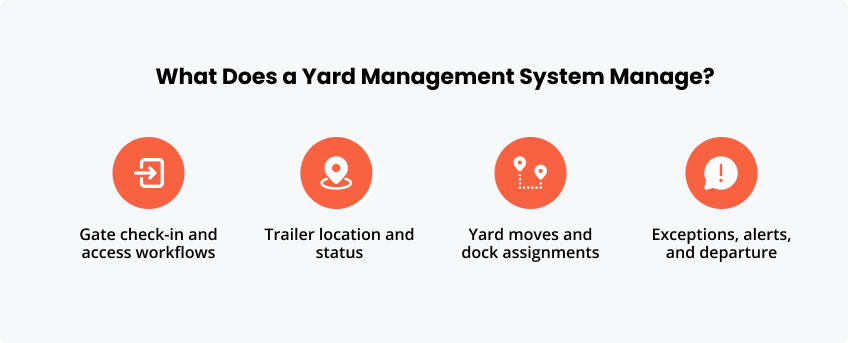
A YMS manages physical yard operations, connecting gate arrivals, trailer locations, dock activities, and departures.
Gate check-in and access workflows
Gate check-in confirms vehicle arrival and determines whether entry is authorized.
A typical workflow includes:
- Identifying the driver, vehicle, and appointment.
- Checking documents and access permissions.
- Assigning a dock or staging area.
- Recording the arrival event.
Self-service kiosks, QR codes, license plate recognition, and access control integrations can automate selected steps.
However, gate automation alone is not equivalent to a complete YMS.
Trailer location and status
Trailer tracking identifies where assets are located and their current operational status.
A YMS can distinguish trailers that are waiting, loading, unloading, ready for collection, or released for departure.
Location updates may come from manual entries, RFID, barcode scans, or GPS-enabled equipment.
Knowing a trailer’s position does not necessarily mean knowing whether it is ready to move.
Yard moves and dock assignments
Yard execution coordinates trailer movements between parking spaces, staging zones, and dock doors.
A YMS can assign movement tasks to a yard jockey and record completion.
This is particularly important for drop-and-hook operations, where drivers leave trailers for later processing rather than waiting for a live load.
Dropped trailers require independent location, status, and movement control.
Exceptions, alerts, and departure
A YMS helps manage unexpected operational events, including:
- Late arrivals and excessive trailer dwell.
- Blocked dock doors.
- Delayed yard moves.
- Missing or incorrectly positioned trailers.
Alerts help teams respond before delays spread.
At departure, the system records exit events and can update connected logistics applications.
How the Two Systems Work Together
Dock scheduling and yard management work together when planned appointments connect directly to actual operational events.
Booking to gate arrival
A carrier books an appointment through the carrier portal.
The scheduling system records the arrival window, shipment reference, and handling requirements. At gate check-in, this information is matched against the arriving vehicle.
Early or late arrivals can trigger revised instructions.
Gate to dock execution
After check-in, the YMS coordinates vehicle positioning.
For a live load, the driver may proceed directly to a dock door. For a dropped trailer, the YMS records its staging location and coordinates subsequent movements.
Dock scheduling maintains the planned appointment, while the YMS records actual execution.
Loading completion and departure
After loading or unloading, the warehouse confirms completion.
The YMS updates trailer status, coordinates any required movement, and records departure.
These events help distinguish waiting time, dock processing time, and exit delays.
Several enterprise systems contribute to the process:
- WMS (Warehouse Management System): Inventory and warehouse operations.
- TMS (Transportation Management System): Transport planning and shipment execution.
- ERP (Enterprise Resource Planning): Orders and business transactions.
- Dock scheduling: Appointment and capacity planning.
- YMS: Physical yard execution.
Integration should use shared appointment IDs, shipment references, trailer identifiers, and timestamps.
Common identifiers provide a reliable connection between booking, gate arrival, dock operations, and departure.
For example, SAP EWM supports dock appointment scheduling and yard management workflows, including transportation units and yard movements.
When Is Dock Scheduling Alone Enough?
Standalone dock scheduling works well when truck movements are predictable and yard complexity is limited.
Live-load operations with limited yard complexity
In live-load operations, drivers typically remain with their vehicles during loading or unloading.
If trucks move directly between the gate and dock, advanced trailer tracking may be unnecessary.
Appointment scheduling and basic gate check-in may provide sufficient control.
Low trailer dwell and simple site layouts
Facilities with short trailer dwell times, limited parking, and straightforward traffic routes often need fewer yard management functions.
For example, a small regional warehouse without routine dropped-trailer operations may manage arrivals through a dock calendar.
The deciding factor is operational complexity, not facility size alone.
Clear signs the scheduling layer is sufficient
Dock scheduling may be enough when:
- Most vehicles leave after loading or unloading.
- Trailers are easy to locate.
- Yard moves are infrequent.
- Drivers move their own vehicles.
- Appointment conflicts cause most delays.
If these conditions apply, implementing a full YMS may add unnecessary complexity.
When Do You Need a YMS?
A YMS becomes necessary when physical trailer movements and changing operational priorities require dedicated coordination.
Dropped trailers and multiple staging zones
A dropped trailer may remain on site after its driver leaves.
It can move between parking areas and docks before collection. Without reliable tracking, staff may struggle to locate it.
A YMS manages these movements and maintains visibility across multiple staging zones.
High traffic, congestion, or lost assets
Even well-planned appointments cannot prevent every operational delay.
Common signs that yard execution needs improvement include:
- Frequent searches for trailers.
- Long queues after gate entry.
- Dock doors waiting for equipment.
- Repeated calls to coordinate moves.
- Unclear movement responsibilities.
These problems require execution control rather than additional appointment slots.
Multi-site visibility and standardization
Organizations with several distribution centers may need consistent yard workflows.
A YMS can standardize trailer statuses, movement records, and operational reporting across facilities.
Shared data definitions allow central teams to compare performance while accommodating different site layouts and operating rules.
Selection Checklist
The choice between dock scheduling vs yard management should reflect actual workflows, integration requirements, and expected operational growth.
Operational questions to ask
| Question | Dock Scheduling | YMS |
|---|---|---|
| Do trailers remain after drivers leave? | Rarely | Frequently |
| Are yard moves common? | No | Yes |
| Are trailer locations difficult to track? | No | Yes |
| What causes delays? | Booking conflicts | Yard execution |
| Are multiple staging zones involved? | No | Yes |
| Is detailed dwell reporting required? | Limited | Extensive |
Evaluate real operating conditions rather than comparing feature counts.
Integration and data requirements
Check whether the solution supports:
- WMS, TMS, and ERP integration.
- Shared vehicle, appointment, and shipment identifiers.
- ASN and purchase order references.
- APIs, EDI, or other supported interfaces.
- Event timestamps, access permissions, and audit records.
For SAP environments, evaluate existing SAP EWM functionality before introducing another platform.
User groups and change management
Dock scheduling mainly serves planners, warehouse coordinators, and carriers.
A YMS additionally supports gate personnel, dock supervisors, and yard jockeys.
Interfaces should match each role. Training should address practical exceptions such as late arrivals, incorrect trailer information, and blocked docks.
Scalability and reporting
Choose software that supports future growth in facilities, dock doors, carriers, and trailer volumes.
Relevant dock scheduling metrics include appointment adherence and slot utilization.
YMS reporting focuses on trailer dwell time, gate-to-dock time, yard move completion, and departure delays.
Sources
European Commission — CER Guidelines (2026)
Conclusion
The choice between yard management and dock scheduling depends on where operational complexity occurs.
If the main challenge is coordinating arrivals and dock capacity, standalone scheduling may be sufficient. If trailers remain on site, move between staging zones, or require dedicated handling equipment, a YMS provides essential execution visibility.
For complex facilities, integrating both systems connects appointment planning with actual yard operations. The best starting point is to map the vehicle journey, identify bottlenecks, and assign clear responsibility for each operational event.
FAQ
Dock scheduling can be included in a YMS or implemented separately. Integrated platforms may combine appointments, gate management, trailer tracking, and yard execution. Other solutions connect specialized applications through APIs. The appropriate architecture depends on operational complexity, existing systems, and the degree of physical movement control required.
Yes. Dock scheduling can operate independently when truck arrivals are predictable, trailer dwell is short, and internal movements are limited. It manages carrier booking, appointment windows, and dock capacity. Basic gate check-in can be handled separately. A YMS becomes more useful when trailers must be tracked and moved throughout the facility.
Dock management focuses on loading and unloading operations at warehouse doors, including assignments, resource availability, and processing status. Yard management covers the wider movement and positioning of trucks and trailers. It connects gates, parking areas, staging zones, and docks, providing operational visibility beyond individual loading bays.
\A shared carrier portal can simplify booking and communication, but it is not mandatory. The priority is consistent information across systems. Carriers should not repeatedly enter the same shipment or vehicle details. If separate portals exist, integrations should synchronize appointments, arrival records, and relevant status updates.
A WMS manages warehouse activities such as receiving, inventory, and loading. A TMS coordinates transport planning and shipment execution. Dock scheduling manages planned arrival capacity, while the YMS coordinates physical yard activity. Shared shipment identifiers and operational events connect these applications and reduce manual updates.