
When an alarm sounds, the greatest danger is not always the hazard. It’s uncertainty.
(Prefer videos? Watch a brief summary of this article below.)
Key Takeaways
- Accountability is the decision point. If you can’t confirm who is safe, leaders hesitate, responders may search unnecessarily, and risk rises fast.
- Manual roll calls don’t scale. Paper lists and radio callouts struggle with visitors, contractors, shift work, and multi-tenant buildings.
- Digital mustering reduces unknowns. The right digital mustering software provides real-time personnel tracking and clearer exception handling.
- Visitors are the common blind spot. Strong safety requires visitor data that actually flows into the muster process.
- Good systems create better drills, not just better dashboards. With clear workflows and evacuation reporting tools, teams improve readiness over time.
When the Alarm Hits, Uncertainty Spreads First
A fire alarm sounds at 2:17 p.m. People pour into stairwells. A contractor exits through a side door. A client pauses at reception to grab a coat.
Ten minutes later, everyone gathers at the emergency assembly point. A floor warden reads names from a printed roster that’s already outdated. Security checks badge swipes, but that only proves who entered — not who made it out.
This is where emergency mustering systems change the outcome. They support workplace evacuation safety by replacing guesswork with a live, shared view of who is safe, who is unaccounted for, and what needs to happen next.
What Is an Emergency Mustering System?
An emergency mustering system is a structured method for confirming the safety status of everyone on-site during an evacuation. It provides incident leaders with a single view of accountability and a unified workflow for resolving exceptions.
In practical terms, it helps answer three questions quickly:
- Who is supposed to be here right now?
- Who has checked in as safe?
- Who requires immediate follow-up?
Digital mustering vs. traditional roll call
Traditional muster methods rely on people and paper. Sometimes that works. Often it doesn’t, especially when conditions get loud, crowded, or confusing.
Digital approaches offer speed and structure through automated headcount systems and a clearer process for tracking emergency evacuations. The difference is not “tech versus no tech.” It’s repeatability versus improvisation.
Who must be included to make it real accountability
Many plans quietly assume “employees only.” Real facilities are more complicated. A credible muster process covers:
- Employees and shift workers
- Contractors and vendors
- Visitors and interview candidates
- Temps and delivery personnel (when applicable to your site rules)
If those groups are handled in separate systems, accountability becomes slower and less reliable.
The Hidden Problems That Derail Accountability
Most safety evacuation plans look solid on paper. Real life is messier. Here are the failure points that create delays and risk.
1) Badge data is useful — but it doesn’t equal “safe.”
Access logs can help estimate expected occupancy, especially when integrated with access control. However, a badge swipe is not a check-out event, and tailgating is a real issue.
A mustering process must confirm status at the muster location, rather than assuming it from entry data.
2) Visitors and contractors are often the biggest roster gap.
This is where many organizations lose time. Visitors may be signed in on paper. A separate team might manage contractors. During an evacuation, those silos show up as “unknowns.”
For reliable safety, visitor data must be really actionable during the incident, not buried in a binder at reception.
3) The roster changes every hour.
Even in a “normal” office, onsite headcount can shift quickly:
- Meetings and offsite appointments
- Hybrid schedules and flexible hours
- Multi-building campuses
- Shared floors in multi-tenant towers
A strong system adapts to that reality instead of fighting it.
4) Stress breaks even good intentions.
Evacuations consume time and attention. People take different routes. They forget roles. They follow crowds. Radios fail or get overloaded.
That’s why mustering is best treated as incident response technology — a guided workflow that reduces decision-making in the moment.
Why Emergency Mustering Systems Matter
Evacuations are time-bound. The longer accountability takes, the bigger the risk. A well-designed solution supports:
- Speed. Faster time-to-clear means faster, safer decisions.
- Accuracy. Fewer false “missing” alerts and fewer overlooked individuals.
- Calm. Clear instructions reduce panic and rumor loops.
It also strengthens evacuation safety protocols by making them easier to execute consistently.
Core Features That Enhance Emergency Safety
Buying committees often get stuck comparing devices. Start with outcomes instead. Here are the capabilities that separate “nice features” from “mission-critical.”
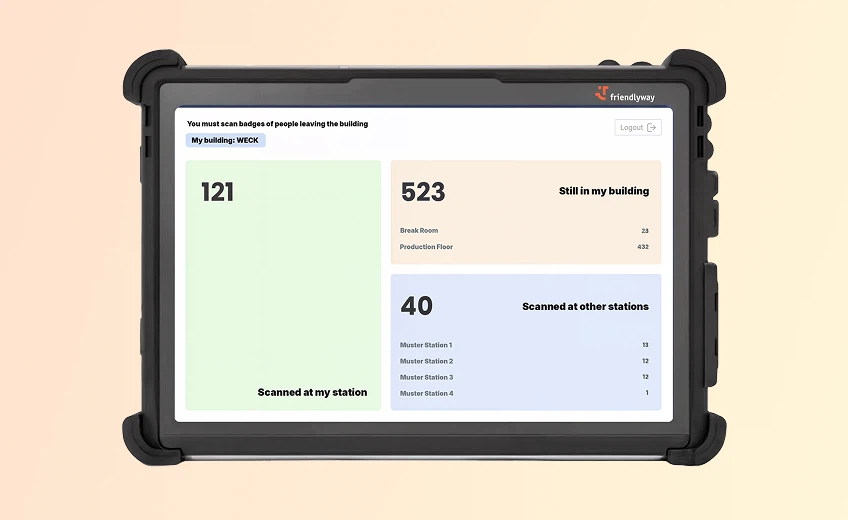
A live status view that teams can trust
You want a dashboard that updates in real time as people check in, with clear definitions. The most important distinction is simple: “not checked in yet” is not the same as “confirmed missing.”
Look for role-based views (incident command, wardens, security, reception), simple status labels that don’t invite interpretation, and a clear path for resolving exceptions. That’s the foundation of employee accountability.
Multiple check-in options — because sites aren’t all the same
Check-in methods should match the environment, not the other way around.
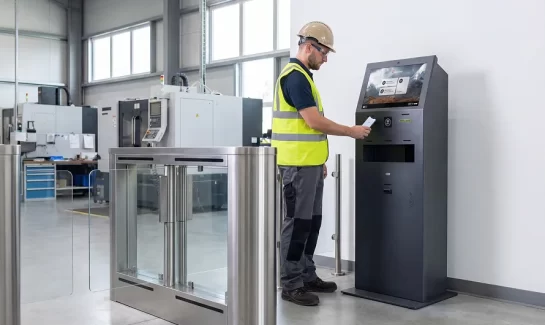
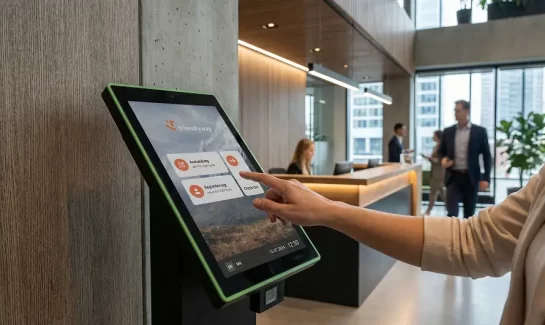
Common modes include: mobile check-in for dispersed teams; tablet workflows for wardens; mustering kiosks for structured, high-volume muster points; badge, QR, or RFID-based check-in when speed and friction matter. The best programs use a blend. Flexibility is a feature.
Resilience when networks and power are imperfect
Emergencies are unfriendly to infrastructure. A mustering solution should plan for network failure. When evaluating options, ask how the system handles:
- Spotty Wi-Fi or weak cellular service
- Power interruptions and battery backup
- Device loss, damage, or misplacement
- Offline or degraded operation with later sync
- A clear manual fallback that still produces usable records
Reliability is part of safety, not a “nice to have.”
Integrations that reduce work instead of creating it
Integration is valuable when it removes manual steps. It becomes a problem when it creates an unnecessary administrator burden. The most practical places to connect systems are:
- Access control for expected occupancy context
- Visitor management so that visitors and contractors are accounted for in the same workflow
- Notifications and alerting systems for coordinated incident messaging
When done well, integration enhances accuracy while keeping the process simple for people in the field.
How It Works in Practice: From Normal Day to Incident Mode
The best mustering programs feel boring on a normal day. That’s a compliment. They build readiness into everyday operations.
Before an incident: set the foundation
Key setup steps typically include: defining primary and backup assembly locations; assigning zones and warden coverage; clarifying escalation rules (who decides, who calls, who documents); ensuring rosters include employees, contractors, and visitors.
This is where emergency preparedness software earns its value. It standardizes roles, plans, and ownership so the response doesn’t depend on one person’s memory.
During an incident: accountability in minutes, not guesswork
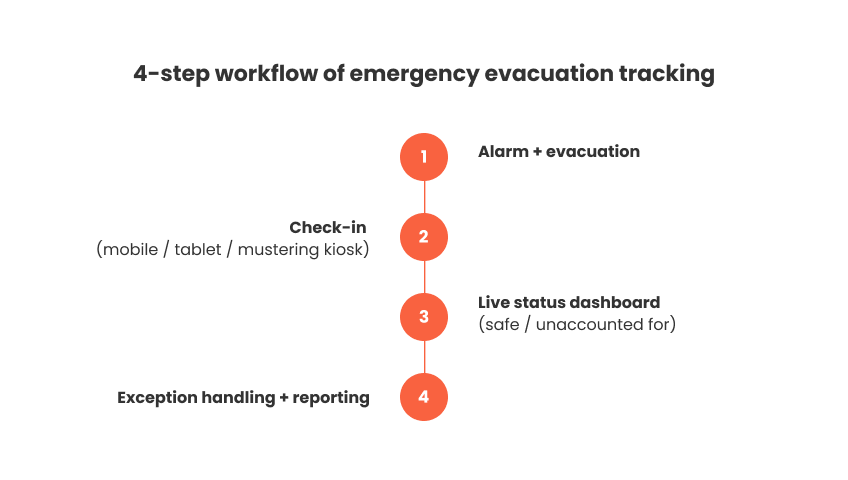
The best workflows are simple enough to execute under stress. A typical sequence looks like this:
- Alarm triggers, and evacuation begins.
- People move to assigned assembly locations.
- Check-ins are completed on mobile devices, tablets, or kiosks.
- Dashboards show who is safe and who is unaccounted for.
- Exceptions are escalated with clear next steps.
That’s the heart of modern emergency evacuation tracking: clarity, speed, and documented exception handling.
After an incident: learn, prove, and improve
Organizations often underestimate what happens after “all clear.” This is where maturity shows. Good post-incident outcomes include: timestamped accountability records; drill performance by zone and by team; clear audit trails for reviews and follow-up actions.
These outputs are your evacuation reporting tools. They turn each drill into a measurable improvement.
Use Cases in Different Industries
Manufacturing and logistics — scale, shifts, and multiple muster zones
Large footprints and changing headcounts make manual muster a slow process. Digital workflows help reduce time spent reconciling lists and increase confidence in who still needs follow-up.
Government and critical infrastructure — strict expectations and documentation
These environments often require tighter permissions, more consistent emergency evacuation procedures, and stronger records. A structured system supports repeatability across teams and their locations.
Corporate and multi-tenant buildings — visitors are the wildcard
Foot traffic is constant. Visitors and vendors rotate all day. In multi-tenant settings, policies can differ by floor. This is where visitor visibility matters most. Visitor safety during evacuation should be built in, not bolted on.
Benefits for Employers and Safety Managers
A mustering solution is a safety tool. It is also a business continuity tool.
Faster decisions that protect people
When status is clear, leaders can confirm evacuation completion, avoid unnecessary re-entry attempts, and coordinate with responders using accurate information.
Better readiness, not just better reports
The value also shows up in drills: faster time-to-account, fewer unknowns, and clearer warden performance. This is how safety becomes measurable, rather than aspirational.
Stronger documentation for audits and internal reviews
Most organizations don’t want “more compliance.” They want fewer surprises. Detailed records can support internal audit readiness, insurance reviews, risk assessments, and post-incident investigations.
How to Implement an Emergency Mustering System
A practical rollout reduces friction and increases adoption.
Step 1: Plan muster zones and ownership first
Start with the basics: where people go, who leads, and how exceptions are handled. Ensure your fire safety evacuation plan works for peak occupancy, not an average Tuesday.
Step 2: Choose hardware based on flow, not preference
Hardware choices should follow evacuation behavior. Many organizations use a mix: kiosks for structured assembly points, tablets for wardens who need mobility, and mobile workflows for campuses or distributed sites.
The right combination depends on how predictable your muster flow is and the level of control you have at the assembly areas.
Step 3: Define data rules and permissions early
This step prevents friction later. Decide: who can see the missing-person status; how long are records retained; how visitor data is handled and protected; who owns administration (EHS, security, facilities, or a shared model).
Step 4: Train in short cycles and measure a few KPIs
Finally, train and drill in short cycles. Keep training practical. Focus on the steps that break most often.
And track metrics that actually change behavior: time to first check-in, time to “all accounted for”, number of unresolved exceptions, and participation rate by zone. These indicators make improvement visible and sustainable.
Explore how friendlyway’s solution helps teams account for employees and visitors faster, with clearer real-time status during incidents.
The Bottom Line: Accountability Is the Difference Between “Evacuated” and “Safe”
A building can be empty and still be unsafe, at least from a decision standpoint. If leaders can’t confirm who is safe, they can’t close the incident with confidence.
That’s why emergency mustering matters. It turns evacuation into a process teams can execute consistently, even under pressure. It also strengthens readiness over time through better drills and better follow-through.
If your current approach depends on clipboards, memory, or luck, pressure-test it in your next drill. Then ask one question: How long would it take us to confidently account for every employee, contractor, and visitor if this were a real incident?
FAQ
It combines an on-site roster with a structured check-in process at muster points. Leaders track status updates in a single view and follow a defined workflow to resolve exceptions.
They remain unaccounted for until resolved. A mature process:
- confirms expected onsite status
- attempts contact
- checks relevant context
- escalates through incident command when necessary
Often, yes. With access-control integration, organizations can improve the expected-occupancy context and reduce manual roster-building.
Yes, and they should be. Visitors can be captured through digital registration, then tracked as part of the incident roster to strengthen accountability.
It depends on the environment.
- Mobile works well for dispersed teams and campuses.
- Kiosks work well for controlled assembly points and high volume.
Many organizations use both.
Ask about resilience. Look for offline-friendly workflows, device-level backups, and clear manual fallbacks that sync later.